Best Sitting Position for Lower Back Pain: A Practical Guide
Best Sitting Position for Lower Back Pain: A Practical Guide. Learn the best sitting position for lower back pain, including desk, couch and driving posture, chair setup, movement breaks and warning signs. Lower back pain is one of the most common musculoskeletal problems worldwide. It can affect people of almost any age and may interfere with work, sleep, exercise, and everyday activities. In 2020, an estimated 619 million people worldwide experienced low back pain, and the World Health Organization identifies it as the leading cause of disability globally.
For many people, sitting for long periods can make lower back pain feel worse. This is particularly common among office workers, students, drivers, and people who spend much of their day working on a computer.
However, there is no single “perfect” sitting posture that works for everyone. A better approach is to find a comfortable, well-supported position, adjust your surroundings, and change positions regularly.
This guide explains the best sitting position for lower back pain, how to set up your chair and workstation, common mistakes to avoid, and when you should seek professional help.
What Is the Best Sitting Position for Lower Back Pain?
The best sitting position for lower back pain is generally one that provides support while allowing your spine, hips, and legs to remain in a comfortable and relatively neutral position.
Try the following:
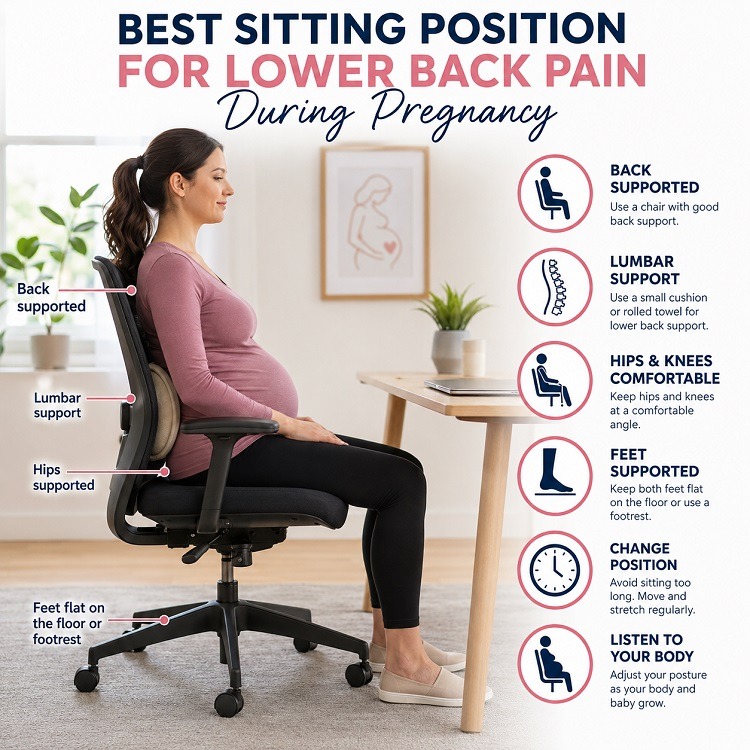
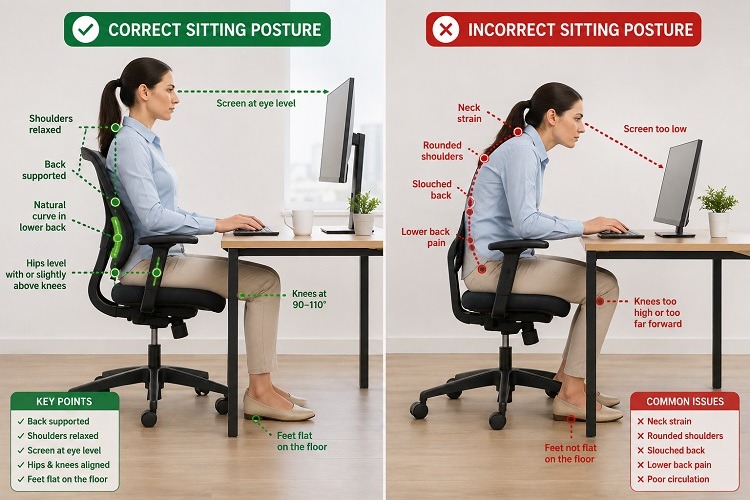
- Sit with your back supported by the chair.
- Keep your lower back comfortably supported while preserving its natural curve.
- Keep both feet supported on the floor or on a footrest.
- Keep your hips level with, or slightly higher than, your knees if this feels comfortable.
- Allow your shoulders to remain relaxed rather than rounded forward.
- Keep your head and neck in a comfortable, neutral position.
- Avoid sitting excessively forward on the edge of the chair.
- Keep frequently used objects within easy reach so you do not repeatedly twist or lean.
- Position your computer screen so that you do not have to continually bend your neck downward.
Good posture does not mean sitting stiffly or holding yourself perfectly upright all day. Comfort and movement matter too.
Evidence-based guidance for low back pain emphasizes remaining active and using appropriate physical activity and rehabilitation rather than relying on one posture or passive treatment alone.
Step-by-Step: How to Sit Properly With Lower Back Pain
If you experience lower back pain when sitting, try this simple setup:
1. Sit fully back in the chair
Rather than perching on the front edge, allow your buttocks and back to be supported by the chair.
2. Support your lower back
Your chair should provide comfortable support to the lumbar region—the lower part of your spine.
If the chair does not provide adequate support, a small rolled towel or suitable lumbar cushion may be comfortable for some people.
However, lumbar support should not force your back into an uncomfortable position.
3. Position your feet
Place both feet comfortably on the floor.
If your feet cannot reach the floor because your chair is too high, consider using a footrest.
4. Adjust your knees and hips
Aim for a comfortable position in which your knees are approximately level with your hips or slightly lower.
There is no need to force a particular angle if it increases your symptoms.
5. Relax your shoulders
Avoid continuously pulling your shoulders backward or sitting rigidly.
Let them remain relaxed while keeping your arms comfortably supported when appropriate.
6. Position your head and neck
Your head should not remain significantly tilted forward for long periods.
This is especially important when using laptops, tablets, or phones.
Best Sitting Position at a Desk
People who work at desks often spend several hours sitting, making workstation setup particularly important.
Chair
Choose a chair that allows you to:
- Keep your feet supported
- Adjust the seat height
- Support your lower back
- Sit comfortably without excessive pressure behind your knees
- Maintain a stable sitting position
Computer monitor
Place the monitor directly in front of you rather than far to one side.
The screen should be positioned at a height and distance that allows you to look at it without continually bending your neck.
Keyboard and mouse
Keep the keyboard and mouse close enough that you do not have to repeatedly reach forward.
Your elbows should be comfortably positioned rather than held far away from your body.
Desk
Your desk should allow enough room for your legs and allow you to work without excessive bending or reaching.
Laptop users
Laptops can create an ergonomic problem because the screen and keyboard are attached.
If you work on a laptop for extended periods, consider raising the screen and using a separate keyboard and mouse.
This allows the screen to be positioned more comfortably while keeping your arms in a better working position.
Best Sitting Position on a Couch
A soft couch may feel comfortable initially but can make it difficult to maintain a supported position.
Deep sofas can allow your pelvis to slide forward while your upper body rounds backward or forward. This can make some people’s symptoms worse.
If you need to sit on a couch:
- Sit toward the back of the seat.
- Support your lower back if necessary.
- Keep your feet comfortably supported.
- Avoid sinking deeply into the sofa.
- Change position regularly.
- Consider using a firmer chair for prolonged work.
The goal is not to avoid soft furniture completely. Rather, notice whether a particular position consistently increases your symptoms.
Best Sitting Position While Driving
Long periods of driving can be particularly uncomfortable for people with lower back pain.
Before driving, adjust your seat so that:
- You can comfortably reach the pedals without stretching your legs.
- Your back is supported by the seat.
- Your lower back is comfortably supported.
- Your knees remain slightly bent when operating the pedals.
- You can reach the steering wheel without leaning forward.
- Your head and neck remain reasonably comfortable.
- The headrest is positioned appropriately for the vehicle.
For long journeys, don’t rely on one sitting position for the entire trip. Take appropriate breaks and move around when it is safe to do so.
Should You Sit With Your Legs Crossed?
Crossing your legs is not automatically harmful.
For some people, however, sitting with one leg crossed over the other for a long time can become uncomfortable or encourage an asymmetrical sitting position.
If crossing your legs does not cause discomfort, occasional leg crossing is generally less important than avoiding prolonged static sitting.
A useful habit is to change positions periodically rather than worrying about maintaining one exact leg position.
Is It Better to Sit or Stand With Lower Back Pain?
Neither sitting nor standing is necessarily the perfect solution.
Standing continuously can also become uncomfortable, while prolonged sitting may aggravate symptoms in some people.
The more useful strategy is position variation.
For example, during a working day you might alternate between:
- Sitting
- Standing
- Walking
- Gentle movement
- Short stretching breaks
The World Health Organization emphasizes physical activity and reducing sedentary behavior as important components of healthy living.
For people with persistent low back pain, exercise and other appropriate non-surgical interventions are also supported by clinical guidance.
How Long Should You Sit if You Have Back Pain?
There is no universal number of minutes that every person with lower back pain should sit.
Your tolerance may depend on the cause of your pain, fitness level, work demands, symptoms, and other individual factors.
Instead of focusing only on a specific time limit, pay attention to how your body responds.
If sitting continuously causes your pain or stiffness to increase, consider:
- Getting up and walking around
- Changing your sitting position
- Performing gentle movements
- Alternating sitting and standing
- Breaking up long periods of computer work
The important principle is to avoid spending most of the day in one static position.
Common Sitting Mistakes That Can Make Lower Back Pain Worse
Slouching for long periods
Slouching may feel comfortable initially but can become uncomfortable when maintained for a long time.
Sitting on the edge of the chair
This can leave your back unsupported and encourage you to lean forward.
Feet dangling
If your feet cannot reach the floor, your sitting position may feel unstable.
Using a poorly adjusted workstation
A monitor, keyboard, or desk that is positioned poorly can encourage repeated bending, reaching, or twisting.
Looking down at a laptop
Long periods of looking down can contribute to neck and upper-back discomfort and may affect your overall sitting position.
Staying completely still
Even a good sitting posture can become uncomfortable when maintained for too long.
Using an excessively soft chair
Very soft furniture may provide inadequate support for prolonged sitting.
How to Choose a Chair for Lower Back Pain
When looking for the best chair for lower back pain, don’t focus only on price or appearance.
Look for a chair that provides:
- Adjustable seat height
- Comfortable back support
- Appropriate lumbar support
- Adequate seat depth
- A stable base
- Comfortable cushioning
- Armrests that can be adjusted appropriately, if useful
- Enough room to change your sitting position
Most importantly, there is no universally best chair.
A chair that works well for one person may be uncomfortable for another. If possible, test the chair and adjust it to your body rather than assuming that a particular design will automatically solve your back pain.
It is also worth remembering that equipment alone is unlikely to address every cause of persistent lower back pain.
Simple Exercises and Movement Breaks for People Who Sit a Lot
Movement is an important part of managing many forms of low back pain.
The WHO recommends physical activity and includes exercise among the interventions that may help people with chronic primary low back pain.
Depending on your symptoms and physical abilities, general movement options may include:
Walking
A short walk can help break up prolonged sitting and keep you moving.
Gentle pelvic movements
While seated or lying down, gentle pelvic movements may help you explore comfortable spinal movement.
Hip mobility exercises
Gentle hip movements can be useful for people who spend considerable time sitting.
Gentle stretching
Some people find gentle stretching of the hips, thighs, or lower back comfortable.
Core strengthening
Progressive strengthening exercises may help improve physical function in people with persistent low back pain.
However, exercises should be individualized when possible. An exercise that helps one person may aggravate another person’s symptoms.
If exercise repeatedly increases your pain, causes new neurological symptoms, or is difficult because of your medical condition, seek advice from a physiotherapist or other qualified healthcare professional.
When Should You See a Doctor or Physiotherapist for Lower Back Pain?
Many episodes of non-specific low back pain improve with time and appropriate activity, but persistent or unusual symptoms deserve professional assessment.
Consider seeing a healthcare professional if:
- Your pain persists or repeatedly returns.
- Your symptoms interfere significantly with work, sleep, walking, or everyday activities.
- Pain travels down your leg.
- You develop numbness or weakness.
- Your symptoms are progressively getting worse.
- You are concerned about the cause of your pain.
Seek urgent medical attention for certain warning signs
Back pain accompanied by new bladder or bowel problems, numbness around the genitals or anus, or significant weakness or numbness affecting both legs can indicate a serious problem requiring urgent assessment.
You should also seek urgent medical advice if back pain is accompanied by:
- Fever, chills, or feeling significantly unwell
- Severe pain that starts suddenly
- Rapidly worsening symptoms
- Significant trauma
Unexplained weight loss or other concerning systemic symptoms should also be discussed with a healthcare professional.
These symptoms do not necessarily mean that you have a serious disease, but they should not be ignored.
Frequently Asked Questions
What is the best sitting position for lower back pain?
Sit with your back comfortably supported, your feet supported, your shoulders relaxed, and your hips and knees in a comfortable position. Most importantly, change positions regularly.
Is sitting on a hard chair better for back pain?
Not necessarily. A chair that is too hard may be uncomfortable, while an excessively soft chair may provide poor support. The best chair is one that supports you comfortably and allows you to change position.
Should I use a lumbar support pillow?
A lumbar support cushion may make sitting more comfortable for some people. It should support your natural lower-back curve without forcing you into an uncomfortable position.
Is it bad to cross your legs when sitting?
Not necessarily. Occasional leg crossing is generally less important than spending long periods in one fixed position. Change positions if crossing your legs causes discomfort.
How often should I get up when sitting?
There is no single evidence-based interval that applies to everyone with back pain. Instead, avoid prolonged uninterrupted sitting and take movement breaks based on your symptoms and work demands.
Is a standing desk better for lower back pain?
A standing desk may help some people vary their position, but it is not automatically better than sitting. The key is to avoid staying in one position for too long.
Can poor sitting posture cause lower back pain?
Poor or uncomfortable sitting habits may contribute to symptoms in some people, but lower back pain has many possible causes. Posture is only one part of the picture.
What is the best chair for someone with back pain?
Look for a chair that can be adjusted to your body and provides comfortable back support. There is no single chair that is best for everyone.
Should I sit upright all day if I have back pain?
No. Sitting rigidly upright all day is unnecessary. A comfortable, supported position combined with regular movement is generally a more practical approach.
Can stretching help lower back pain caused by sitting?
Gentle movement and stretching may help some people, but the most appropriate exercises depend on the individual. Exercise is an important part of evidence-based management for many people with persistent low back pain.
Final Thoughts
Finding the best sitting position for lower back pain is not about forcing your spine into one rigid “perfect” posture.
Instead, aim for a comfortable, supported sitting position, adjust your workstation or driving seat to suit your body, and avoid remaining in the same position for prolonged periods.
If you spend much of your day sitting, make movement part of your routine. Stand, walk, change position, and perform appropriate exercises when possible.
Most importantly, remember that lower back pain has many possible causes. Good sitting habits can be helpful, but persistent, severe, or unusual symptoms may require assessment by a doctor or physiotherapist.
Medical Disclaimer
This article is intended for general educational purposes and does not replace professional medical assessment, diagnosis, or individualized treatment. If you have persistent, severe, worsening, or concerning symptoms, consult a qualified healthcare professional.
Sources
- World Health Organization – Low Back Pain
- WHO Guideline on Chronic Primary Low Back Pain
- NHS – Back Pain
- American College of Physicians – Clinical Guidelines
About the Author